Best Travel Second Screen for Laptop: Top Portable Monitors for on-the-Go Productivity
When working remotely or traveling, a reliable second screen can transform your productivity. The following five portable monitors are designed for easy travel, quick setup, and broad device compatibility. Each option supports common laptop connections through USB-C or HDMI and offers features like IPS panels, HDR, and built-in speakers. This guide highlights practical specs, use cases, and how to choose the right secondary display for your needs.
Overview Table
| Product | Brand | Key Benefit | Connectivity | Weight |
|---|---|---|---|---|
| KYY Portable Monitor 15.6″ | KYY | Bright IPS panel with HDR and built-in speakers | USB-C, Mini-HDMI | 1.7 lb |
| ForHelp 15.6″ | ForHelp | Magnetic smart holster and ultra-slim design | Two USB-C, Mini HDMI | 1.52 lb |
| KEFEYA 14″ | KEFEYA | High-efficiency dual-screen workflow | USB-C, HDMI | About 1.0-1.3 lb |
| Setclod 14.2″ | Setclod | Very thin and travel-friendly, solid image | USB-C, HDMI | ≈1.3 lb |
| InnoView 15.6″ | InnoView | Plug-and-play with pass-through charging | Two USB-C, HDMI | About 1.5-2.0 lb |
Each product below is presented with an accessible summary of its strengths and practical use cases to help you pick a companion screen for business trips, remote work, or travel-heavy schedules.
KYY 15.6″ Portable Monitor: Versatile and Vivid

The KYY portable monitor delivers a 15.6-inch IPS display with 178-degree viewing angles, 1920×1080 resolution, and HDR to enhance color fidelity. Its low blue light and flicker-free technology help reduce eye strain during extended sessions. With both USB-C and Mini-HDMI inputs, it supports a one-cable setup for compatible laptops and devices, plus dual built-in speakers for multimedia tasks. A lightweight 1.7-pound profile makes it well-suited for on-the-go setups where you need a second screen without bulk.
Who benefits: professionals needing extra screen real estate while traveling, students reviewing materials, or gamers seeking a portable second display for a console-connected setup. The included smart cover protects the screen in transit and doubles as a stand for quick desk configurations.
ForHelp 15.6″ Portable Monitor: Ultra-Slim and Flexible

The ForHelp monitor emphasizes extensive compatibility with two full-featured USB-C ports and a Mini HDMI input, enabling a one-cable or dual-cable setup depending on power needs. Its 1920×1080 IPS panel delivers bright, accurate colors and wide viewing angles, while the aluminum body keeps the unit lightweight at about 1.52 pounds. The slim 0.3-inch profile makes it easy to slip into a bag for travel, and the magnetic smart holster provides convenient storage and quick access on the go.
Who benefits: road-warriors who frequently switch between devices (laptops, consoles, phones), remote workers needing a compact dual-monitor environment, and travelers who value a sturdy, portable option with straightforward power management.
KEFEYA 14″ Dual Screen Extender: Efficient On-The-Go

KEFEYA focuses on boosting productivity with a compact 14-inch external display that can extend your laptop’s workspace. The combination of USB-C and HDMI inputs supports flexible configurations, and the 1920×1080 IPS panel offers a vivid, sharp picture with a 60Hz refresh rate. The device is designed for plug-and-play use with no driver installation, helping you set up quickly during travel. It’s especially helpful for professionals who juggle multiple windows, video conferencing, and real-time editing while away from a traditional desk.
Who benefits: freelancers, remote workers, and students who need to push productivity on the road, as well as gamers or content creators who want to double their screen real estate without adding bulk.
Setclod 14.2″ Ultra-Thin Travel Monitor

The Setclod external monitor is designed for ultralight travel, featuring a razor-thin 0.17-inch profile and a compact 1.3-pound weight. The 14.2-inch IPS display with 1920×1080 resolution and 300 nits brightness delivers clear visuals and HDR support for more lifelike images. Its versatile rotation and plug-and-play setup ensure easy angle adjustments and quick use with USB-C or HDMI connections. The slim build and modern aesthetics make it a solid choice for frequent travelers who value discretion and portability.
Who benefits: travelers who prioritize ultra-light gear, business travelers needing a discreet second screen, and students who carry minimal luggage but still require enhanced multitasking capability.
InnoView 15.6″ Portable Monitor: Pass-Through Power
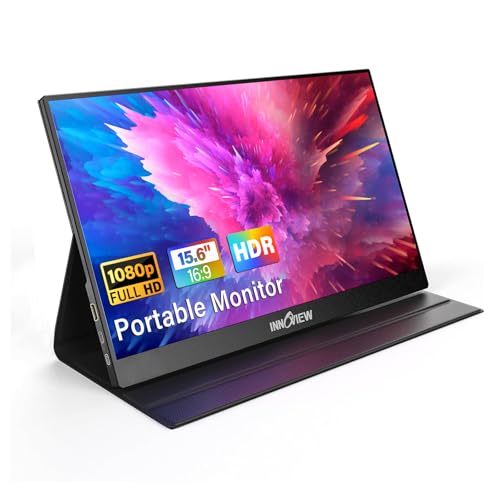
The InnoView portable monitor prioritizes plug-and-play simplicity with two USB-C ports and an HDMI input. It can accept power through the USB-C connection, supporting power pass-through for a cleaner desk setup. Its 15.6-inch IPS panel delivers 1920×1080 resolution with HDR support and a wide 178-degree viewing angle, helping users stay productive in shared spaces or confined environments. Built-in speakers add convenience for presentations and media playback while traveling.
Who benefits: remote workers who want a seamless single-cable setup, students and travelers who need a flexible screen for classes, and gamers seeking a portable second display for consoles.
Vixtan 14″ Portable Dual Monitor: Ultra-Thin and Strong

Vixtan emphasizes a slim, robust construction with a 14-inch full HD IPS display, 100% sRGB coverage, and 300 nits brightness for vibrant visuals. The ultra-thin profile and about 1.3-pound weight make it especially travel-friendly, while the anodized aluminum body supports durability. This monitor is designed to meet the needs of professionals who require a reliable second screen for multitasking in airports, coffee shops, or co-working spaces.
Who benefits: professionals on business travel, creators who need accurate color and portability, and students who want a sleek, unobtrusive second screen for study sessions on the go.
Buying Guide: Key Considerations For A Travel Second Screen
- Size and weight: For travel, a 14–15.6 inch display often offers a good balance between readability and portability. Lighter models are easier to carry but may trade off panel brightness or durability.
- Connectivity: Look for USB-C with power delivery and at least one HDMI input. USB-C is ideal for a single-cable setup; ensure your device supports DP Alt Mode or Thunderbolt.
- Panel quality: IPS panels provide wide viewing angles and accurate color. HDR support helps with media and game visuals, though HDR performance varies by panel.
- Power options: Some monitors support pass-through charging or only require USB-C for both data and power. If you frequently work with battery-limited devices, pass-through could be beneficial.
- Built-in peripherals: Integrated speakers help with brief media playback, but external speakers or headphones may still be preferred for longer sessions and better sound.
- Stand and portability: A smart cover or foldable stand adds convenience for on-the-go setups. A slim profile reduces bulk in luggage.
- Compatibility: Devices range from laptops and desktops to game consoles and phones. Ensure the monitor supports your typical setup, including Mac, Windows, Android, and gaming consoles if needed.
- Durability and heat: Aluminum bodies and robust hinges improve longevity. Consider heat dissipation features if you use the display for extended periods.
- Ease of setup: A plug-and-play, driver-free experience reduces friction in travel environments with limited access to software updates or peripherals.
- Price-to-feature balance: Compare features like color accuracy, brightness, and the number of inputs against price to find the best value for your travel needs.