Best Travel Monitors for Laptops: Top Picks for on-the-Go Productivity
Travel-friendly laptop monitors extend your screen real estate without tying you to a desk. The following picks deliver crisp 1080p displays, wide viewing angles, and plug-and-play ease to boost work, gaming, and entertainment while on the road. Each option supports USB-C or HDMI connections, making them compatible with most laptops, tablets, and game consoles. This guide highlights five standout models with varied features like built-in speakers, HDR, VESA mounting, and ultra-slim profiles to help you choose the right portable display for your setup.
| Product | Display | Key Features | Connectivity |
|---|---|---|---|
| KYY Portable Monitor | 15.6″ FHD 1080p | IPS, HDR, eye care, built-in speakers | USB-C, Mini-HDMI |
| cocopar Portable Monitor | 15.6″ FHD 1080p | VESA mountable, dual USB-C, HDR | USB-C, Mini HDMI |
| Yodoit Portable Monitor | 15.6″ FHD 1080p | Wide compatibility, 2 USB-C ports | USB-C, USB-C |
| CIDETTY Laptop Screen Extender | 14″ FHD 1080p | Ultra-thin, built-in speakers, case | HDMI, USB-C |
| InnoView Portable Monitor | 15.6″ FHD 1080p | Plug-and-play, HDR, built-in speaker | USB-C, HDMI |
KYY Portable Monitor: Ultra-Slim 15.6” FHD Dual-Mode Display

The KYY 15.6-inch portable monitor blends a 1920×1080 IPS panel with HDR support and a wide 178° viewing angle for comfortable work or gaming on the go. Its ultra-slim 0.3-inch profile and lightweight 1.7 lb body make it easy to slip into a bag. It supports two Full Function Type-C ports and a Mini-HDMI input, enabling a single-cable solution when devices support Thunderbolt 3/3.1 USB-C. The monitor includes built-in 2x stereo speakers and a 3.5mm audio input, enhancing multimedia体验 without extra accessories. Eye-friendly features aim to reduce blue light and flicker for longer sessions.
cocopar Portable Monitor: 15.6″ FHD Travel Display

The cocopar 15.6″ portable monitor emphasizes plug-and-play versatility with two USB-C ports and a mini HDMI input. It supports extend and mirror modes, and its HDR-ready IPS panel provides wide color gamut and vivid detail. The display is VESA-mount compatible, enabling stable setups with stands or arms. A notable feature is the single USB-C cable solution for power and display when the host device supports Thunderbolt 3/4 or USB 3.1 DP Alt Mode. This makes it a convenient secondary screen for travel, meetings, and presentations without extra power bricks.
Yodoit Portable Monitor: 15.6” Travel Screen

The Yodoit monitor offers wide compatibility and dual USB-C ports to simplify connections with laptops, PCs, Macs, game consoles, and mobile devices. Its 1920×1080 IPS panel delivers sharp images and wide viewing angles for work or gaming on the road. The device emphasizes portability with a compact footprint and light weight, enabling easy on-the-go productivity. A note about Mac usage: avoid using certain USB-C cables that do not carry video/audio signals for optimal compatibility, and rely on the included or recommended cables for best results.
CIDETTY Laptop Screen Extender: 14” Ultra-Thin FHD IPS

The CIDETTY 14-inch extender emphasizes ultra-thin construction with a 0.24-inch thickness and built-in speakers. It’s designed for plug-and-play use across Windows, macOS, Linux, and popular game consoles like PS, Xbox, and Switch. While it offers broad compatibility, note that some MacBook models with M-series chips or certain Surface devices may have limitations due to port configurations. A dedicated protective case improves portability for travel or fieldwork, and the display includes blue light filtering for extended viewing comfort.
InnoView Portable Monitor: 15.6” FHD On-The-Go Screen
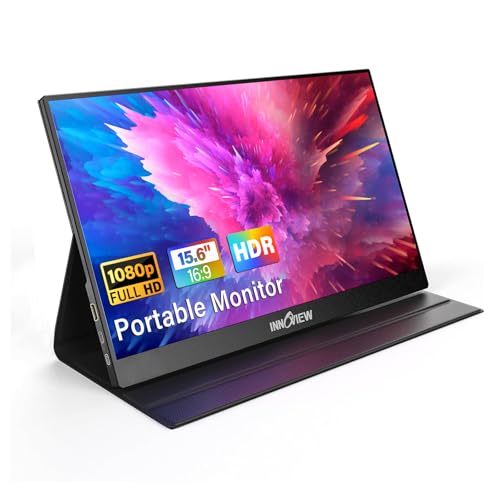
The InnoView 15.6-inch monitor combines plug-and-play convenience with HDR support and an IPS panel for accurate colors and broad viewing angles. It features two USB-C ports and an HDMI input for flexible connectivity with laptops, desktops, smartphones, and gaming consoles. Its built-in speaker array reduces the need for external audio gear, while the included protective case adds portability. The device emphasizes easy setup for travelers, students, and professionals who need a reliable external display without software installs or drivers.
Buying Guide: Key Purchase Considerations
- Display quality and size: For desk-like productivity, a 15.6-inch 1080p panel with IPS technology ensures crisp text and accurate colors. If you travel often, a lighter, thinner model improves portability.
- Connectivity: Look for USB-C with power delivery for a single-cable setup, and an HDMI input as a fallback. Ensure your devices support DP Alt Mode or Thunderbolt 3/4 to maximize compatibility.
- Power options: Some monitors draw power from the host device via USB-C; others may require an external power source. Consider pass-through charging if you want a clean setup on the go.
- Color accuracy and HDR: If you edit photos or videos, prioritize wider color gamut (sRGB/Adobe RGB) and HDR for richer, more lifelike images.
- Ergonomics and mounting: VESA mounting or adjustable stands help create stable dual-monitor configurations. Ultra-thin designs save bag space but may have fewer ports.
- Built-in audio and eye care: Integrated speakers are convenient, while blue light filtering and flicker-free technology reduce eye strain during long sessions.
- Durability and accessories: A rugged case or protective cover protects the panel in transit. Check for bundled stands, privacy covers, and screen protectors if needed.